Networking forms the foundation of cloud infrastructure, with virtually every service depending on it for communication and connectivity. While many engineers assume networking is solely the domain of system administrators or DevOps teams, this perspective can severely limit their effectiveness. Understanding cloud networking fundamentals is essential for troubleshooting complex production issues, designing scalable architectures, and making informed technical decisions. Without this knowledge, engineers often struggle to diagnose problems that span multiple services or optimize systems for performance and reliability.
We’ll take AWS as a concrete cloud provider to review cloud networking.
AWS Basics
We first need to consider AWS basics because there are part of the bigger picture.
AWS Account serves as the highest-level container in AWS, encompassing all resources and services within a single billing and administrative boundary. Think of it as your organization’s dedicated space in the AWS cloud, where you can provision compute instances, storage, networking components, and other services. The account manages billing, access controls, usage monitoring, and security policies for all resources within it. This centralized approach allows organizations to maintain clear oversight of their cloud infrastructure while establishing consistent governance across all AWS services.
AWS customers often create multiple accounts for several strategic reasons:
- Separation of applications — Different applications can have distinct security requirements, compliance needs, or operational teams, making account-level isolation beneficial
- Separation of tenants — Multi-tenant applications may require strict data isolation between customers, which account boundaries naturally provide
- Environment isolation — Separate accounts for development, staging, and production environments prevent accidental cross-environment impacts
- Cost allocation — Individual accounts enable precise cost tracking and billing for different business units or projects
- Compliance requirements — Certain regulations mandate strict separation of data and systems, which account boundaries help satisfy
Multi-account setup ensures clear separation of resources, and guarantee that actors in one account won’t be able to affect other accounts.
AWS Regions is the next level of separation within accounts. Most AWS resources are region-specific, including EC2 instances, RDS databases, VPCs, and S3 buckets, while some services like IAM users, Route 53, and CloudFront operate globally across all regions. Region represents a location where servers and data centers reside physically. For example, the US North Virginia region is called us-east-1. So customers have to choose a physical location to host their services. Region selection impacts several critical factors including performance, legal compliance (GDPR requires EU citizen data to remain within EU boundaries), cost variations between regions, service availability, and disaster recovery capabilities. Organizations can also build multi-region architectures for enhanced availability and global reach.
AWS Availability Zones (AZs) are isolated data centers within a region, typically 2–6 per region, connected by high-speed, low-latency networks. They enable high availability by allowing applications to span multiple physical locations while maintaining fast interconnectivity.
Local Zones extend AWS infrastructure closer to end users in metropolitan areas, providing single-digit millisecond latency for applications requiring real-time responsiveness, such as gaming or AR/VR applications.
Edge Locations are AWS’s global content delivery network (CDN) points of presence, numbering in the hundreds worldwide. They cache content close to users for services like CloudFront and Route 53, dramatically reducing latency for static content delivery.
AWS Networking services
AWS VPC
AWS VPC stands for Virtual Private Cloud. Think of it as your own isolated network environment within AWS, similar to a traditional data center but virtualized in the cloud. Resources within a VPC can communicate with each other using private IP addresses, while being logically separated from other customers’ resources. Each AWS account comes with one default VPC per region, providing immediate connectivity for resources. Users can create up to 5 additional VPCs per region, though this limit can be increased through AWS support.
Each VPC is assigned a CIDR block (Classless Inter-Domain Routing), which defines the range of IP addresses available within that VPC. For example, a CIDR block of 10.0.0.0/16 provides 65,536 IP addresses (from 10.0.0.0 to 10.0.255.255). When creating a VPC, you must specify this CIDR block, and all subnets within the VPC will use portions of this address space. It's important to plan CIDR blocks carefully to avoid conflicts with other networks you may need to connect to later.
Key properties of AWS VPCs include:
- Isolated network environment — Complete logical separation from other AWS customers and even other VPCs in your account
- Private IP address space — Resources communicate using RFC 1918 private IP ranges (10.0.0.0/8, 172.16.0.0/12, 192.168.0.0/16)
- Customizable network topology — Full control over subnets, route tables, gateways, and security groups
- Multiple Availability Zone support — Subnets can span different AZs for high availability
- Scalable architecture — Can accommodate thousands of resources across multiple subnets
Subnets
Subnets are subdivisions of a VPC that allow you to group resources and apply different networking rules. Each subnet exists within a single Availability Zone and uses a portion of the VPC’s CIDR block. Organizations create multiple subnets for several reasons:
- High availability — Spreading resources across subnets in different AZs ensures redundancy
- Security segmentation — Separate public-facing web servers from private databases
- Access control — Public subnets have internet access via Internet Gateway, while private subnets remain isolated
- Compliance requirements — Different tiers may need distinct security controls
By default, each VPC contains one subnet per Availability Zone in the region.
Internet connectivity
Route tables, Security Groups and NACLs
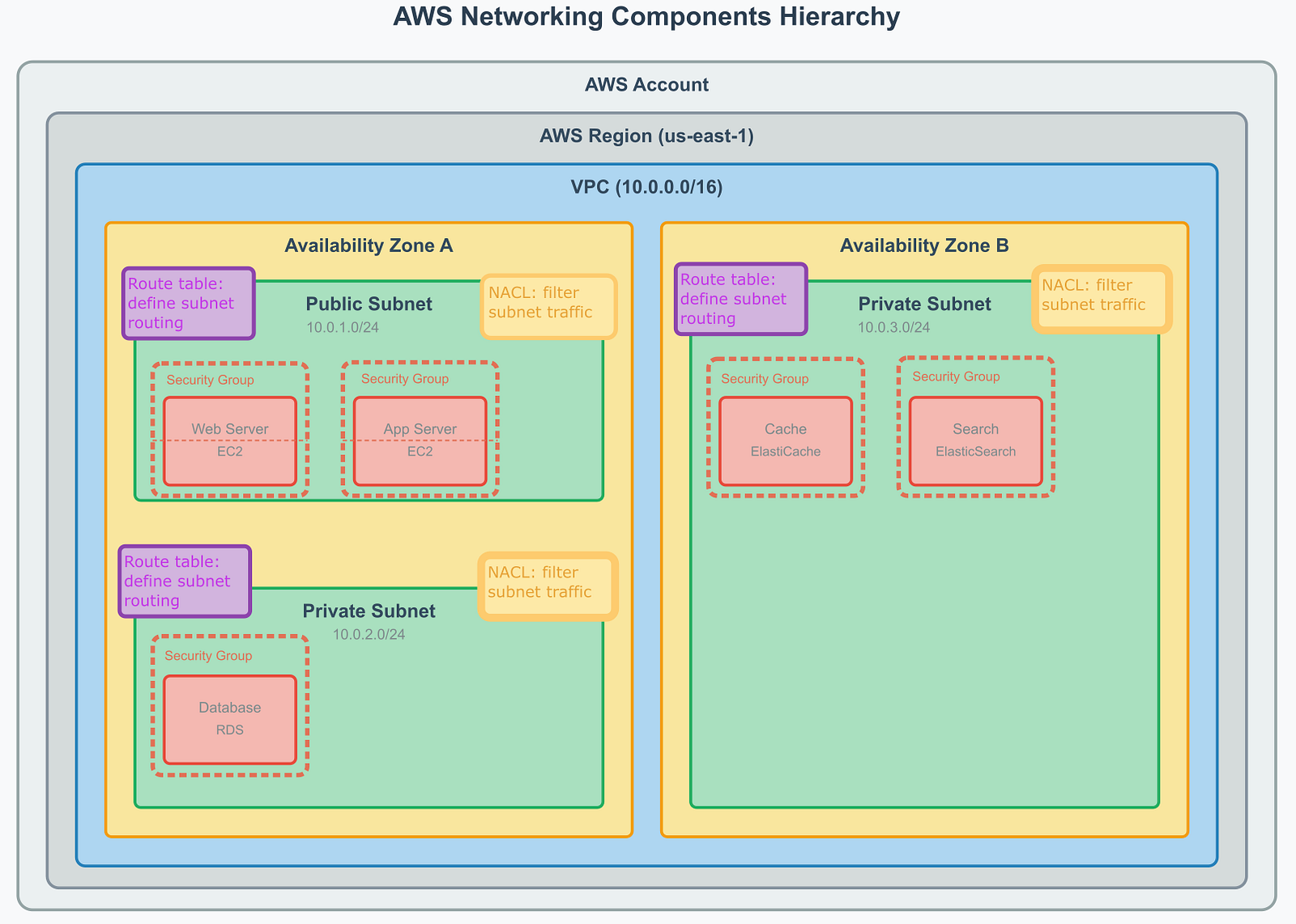
Route tables are assigned to subnets and define routing rules that determine where network traffic is directed. Each route table contains a set of rules (routes) that specify the destination network and the target (gateway, network interface, or connection) to reach that destination. Route tables control traffic flow but do not filter or block traffic — they simply direct it to the appropriate destination. Every subnet must be associated with exactly one route table, though multiple subnets can share the same route table.
Example of route table:
Destination Target VPC CIDR Local 0.0.0.0/0 igw-1
Security group is created at the VPC level and controls access on the resource level (e.g. the EC2 instance). It controls traffic based on protocols, ports, and IP addresses. You define inbound and outbound rules for the security group. SGs are stateful (you can get response from the AWS resource without additional configuration). Each VPC has a default SG (can’t be removed), and more can be created.
Example of SG:
Type Protocol Port range Destination Description SSH TCP 22 117.212.92.68 Some SSH rule
Network Access Control Lists (NACLs) operate at the subnet level and provide an additional layer of security beyond security groups. Unlike security groups which control traffic at the instance level, NACLs filter traffic as it enters or leaves a subnet. NACLs are stateless, meaning return traffic must be explicitly allowed through both inbound and outbound rules. They serve as a subnet-level firewall and are often used to implement defense-in-depth security strategies. Each VPC comes with a default NACL that allows all traffic, and each subnet must be associated with exactly one NACL.
Example of NACL:
Rule number Type Protocol Port range Source Allow/deny 123 All traffic All All 0.0.0.0/0 Allow * All traffic All All 0.0.0.0/0 Deny
Working Together: Route Tables, Security Groups, and NACLs
These three networking components work in layers to provide comprehensive traffic control:
- Route Tables determine where traffic goes — they’re like road signs directing traffic to its destination
- NACLs act as the first security checkpoint at subnet boundaries — like a perimeter fence around a building
- Security Groups provide the final security layer at individual resources — like door locks on specific rooms
This layered approach enables both broad network routing and fine-grained security controls. For example, a route table might direct web traffic to a public subnet, a NACL might block suspicious IP ranges at the subnet level, and security groups might restrict database access to only specific application servers. This defense-in-depth strategy ensures robust network security and proper traffic flow.
Amazon VPC-to-Internet Connectivity
Internet Gateway
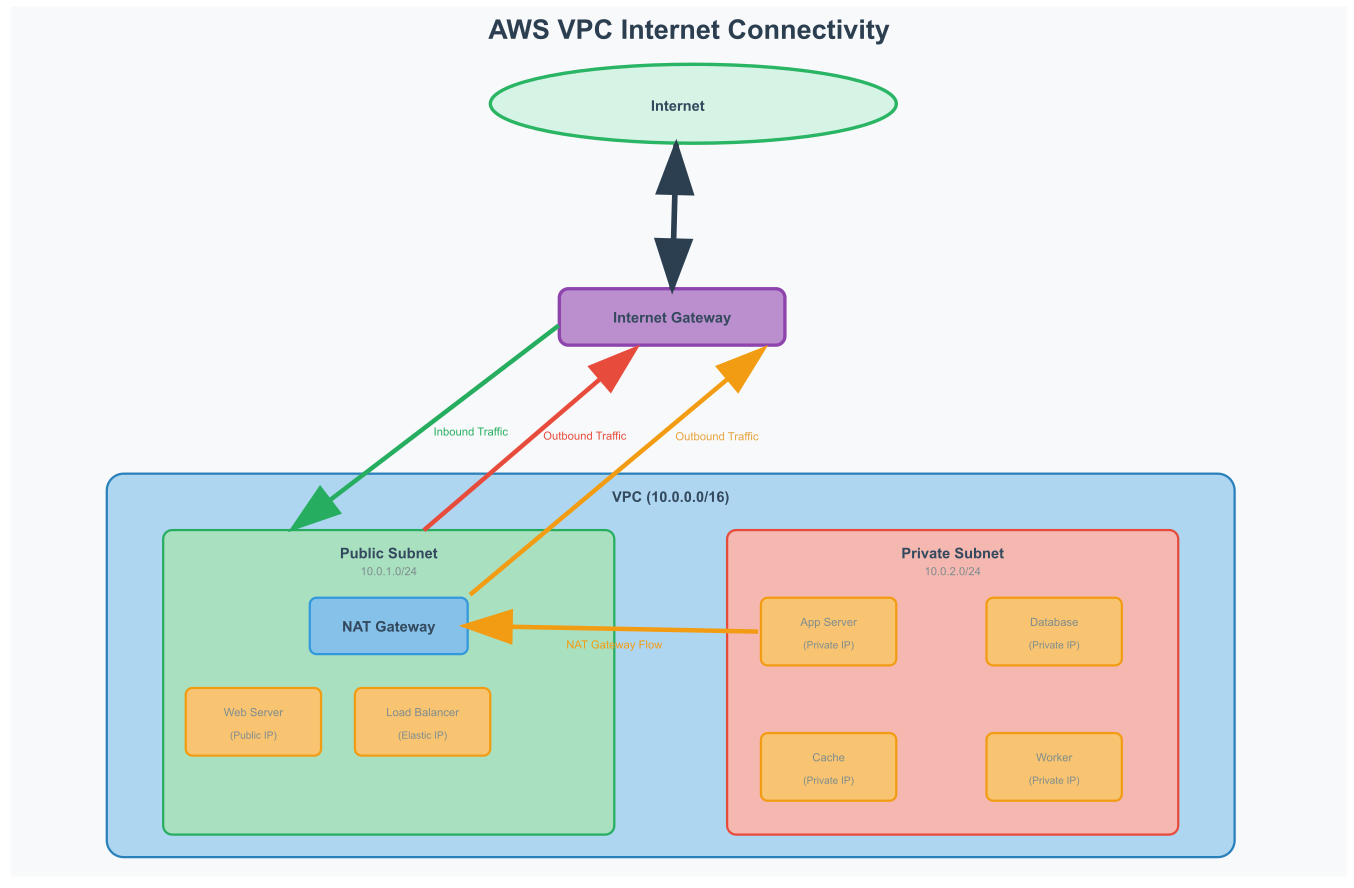
An Internet Gateway (IGW) serves as the bridge between your VPC and the public internet. Think of it as the front door to your virtual data center — it allows resources in public subnets to communicate with the internet while maintaining security through route tables and security groups.
Key characteristics:
- Bidirectional connectivity — Enables both inbound and outbound internet traffic
- One per VPC — Each VPC can have only one attached Internet Gateway
- Public IP requirement — Resources need either an Elastic IP or public IP to communicate through the IGW
- Route table integration — Requires explicit routes (0.0.0.0/0 → IGW) in subnet route tables to enable internet access
NAT Gateway
Network Address Translation (NAT) Gateway enables resources in private subnets to access the internet for outbound connections while preventing inbound internet traffic from reaching them. This is essential for private resources that need to download updates, access APIs, or communicate with external services.
Key characteristics:
- Outbound-only connectivity — Allows private resources to initiate connections to the internet but blocks incoming connections
- High availability — AWS-managed service with automatic failover within an Availability Zone
- Elastic IP required — Must be associated with an Elastic IP address for internet connectivity
- Private subnet routing — Route tables in private subnets point to NAT Gateway for internet-bound traffic (0.0.0.0/0 → NAT Gateway)
This diagram illustrates how Internet Gateway enables bidirectional communication for public subnets, while NAT Gateway provides secure outbound-only internet access for private subnets.
Connectivity Between Amazon VPCs
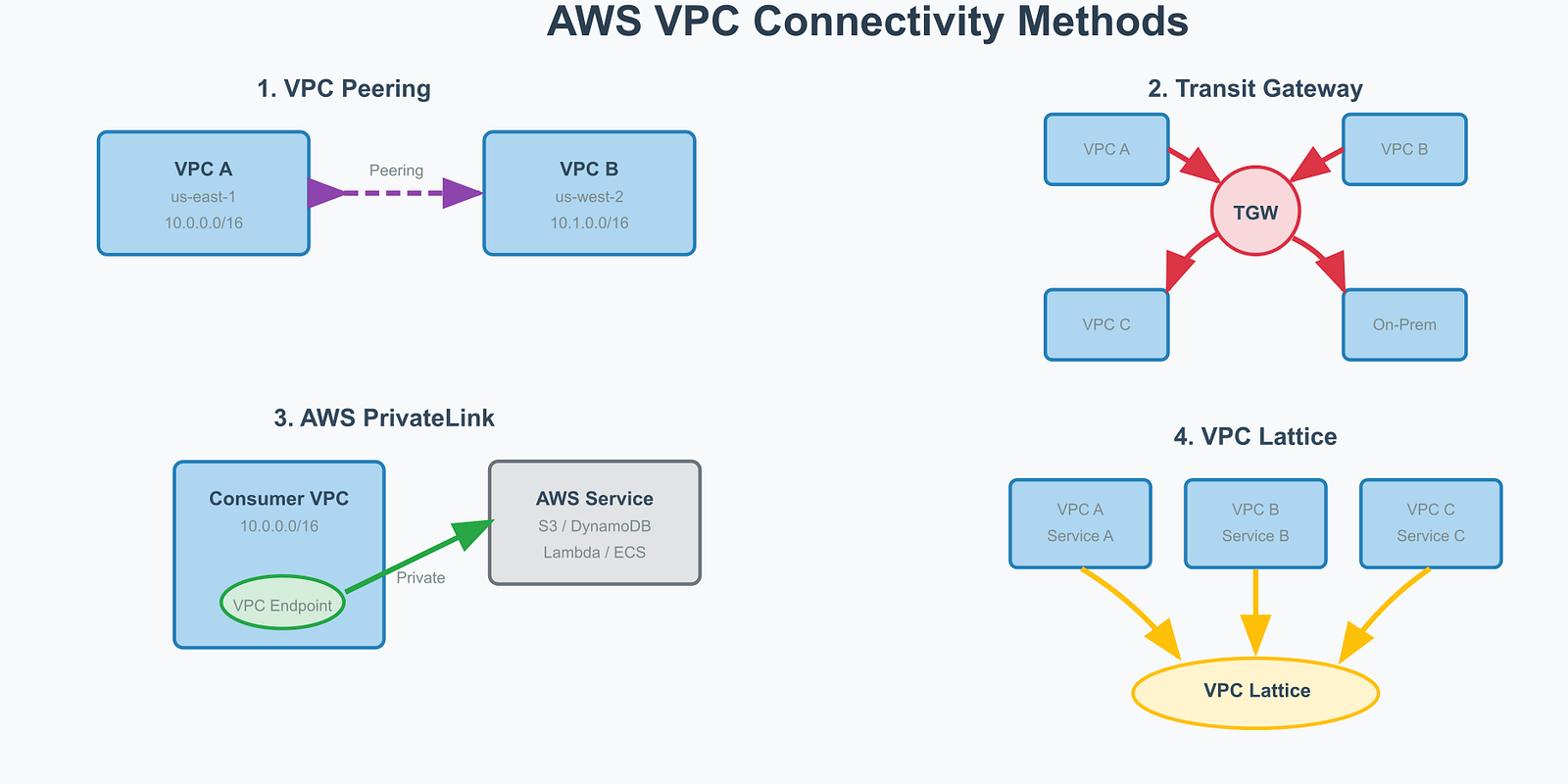
AWS provides several methods to connect VPCs, each designed for different use cases and scale requirements.
VPC Peering
VPC Peering creates a direct, private network connection between two VPCs, allowing resources to communicate as if they were in the same network. It works within the same region or across regions, enabling simple point-to-point connectivity. However, peering connections don’t support transitive routing — if VPC A peers with VPC B, and VPC B peers with VPC C, VPC A cannot automatically reach VPC C.
AWS Transit Gateway
Transit Gateway acts as a network hub, simplifying connectivity between multiple VPCs, on-premises networks, and AWS services. Instead of creating individual peering connections between each VPC pair, all networks connect to the Transit Gateway, which handles routing between them. This hub-and-spoke model dramatically reduces complexity and supports transitive routing, making it ideal for large-scale network architectures.
AWS PrivateLink
PrivateLink enables private connectivity between VPCs and AWS services or third-party services without traversing the public internet. It creates VPC endpoints that allow secure access to services like S3, DynamoDB, or SaaS applications. Traffic flows through AWS’s private network backbone, ensuring high security and performance while eliminating internet gateway dependencies.
VPC Lattice
VPC Lattice is a newer service that provides application-layer networking, allowing secure communication between services across VPCs and accounts. It operates at the application level rather than the network level, offering features like service discovery, load balancing, and access controls. Lattice simplifies service-to-service communication in microservices architectures spanning multiple VPCs.
VPNs
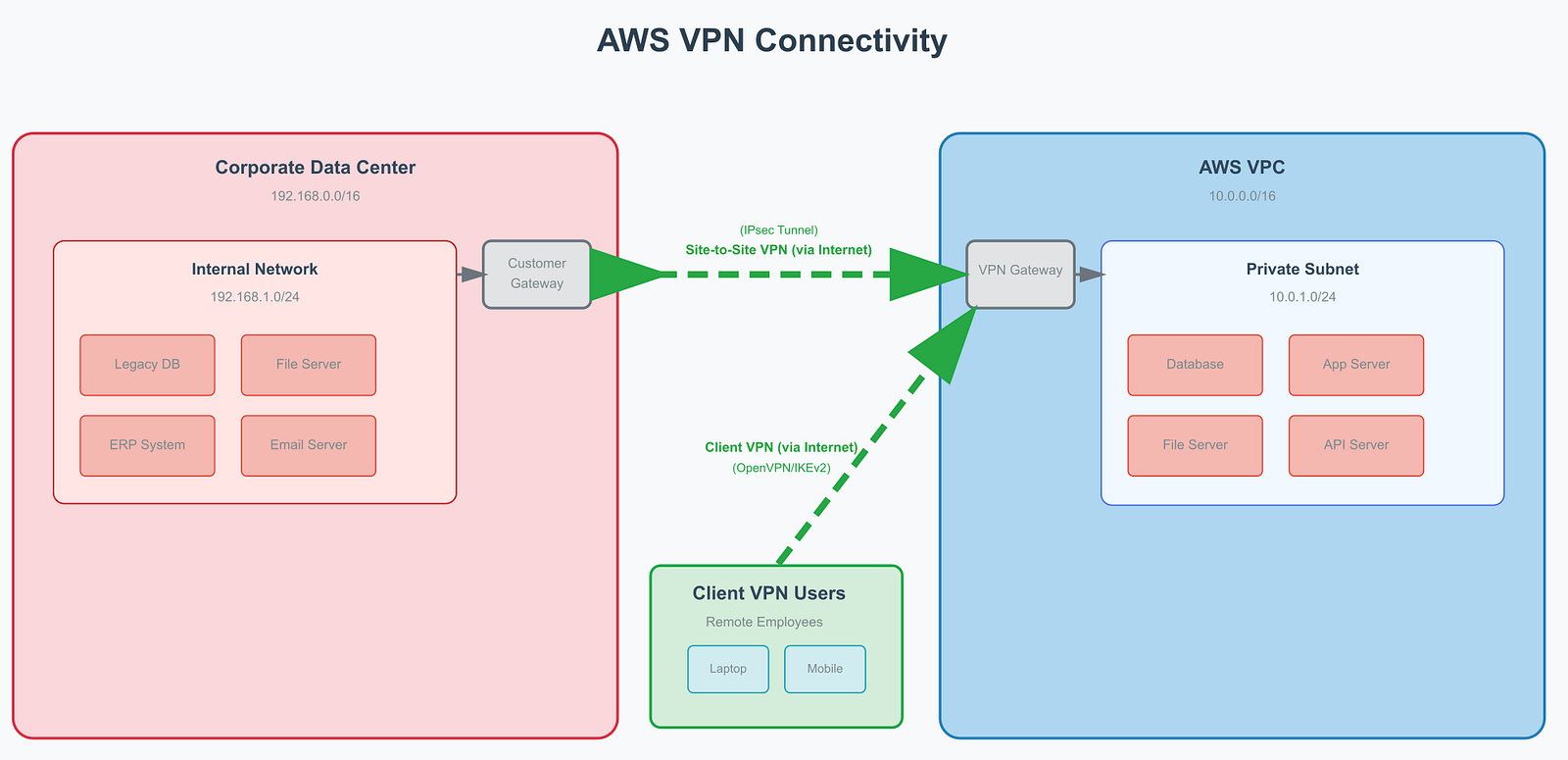
AWS provides VPN solutions to securely connect external networks and devices to your VPC over the internet. These encrypted connections extend your private network infrastructure into the cloud.
Site-to-Site VPN
Site-to-Site VPN connects entire networks, such as your corporate data center, to AWS VPCs. This enables hybrid cloud architectures where on-premises systems can securely communicate with cloud resources. For example, a company might keep their legacy database servers in their data center while running new applications in AWS, with Site-to-Site VPN providing seamless connectivity between both environments.
Client VPN
Client VPN allows individual devices to connect securely to VPC resources. Remote employees can access private applications, databases, or development environments hosted in AWS as if they were physically in the office. This is particularly valuable for accessing internal tools, databases, or applications that shouldn’t be exposed to the public internet.
Both VPN types use IPsec encryption to ensure data security during transmission and integrate with AWS routing and security controls, maintaining the same level of security as internal VPC traffic.
Amazon Route 53 and CloudFront
These global AWS services optimize content delivery and domain name resolution to improve application performance and user experience.
Amazon Route 53 is AWS’s scalable DNS service that translates domain names into IP addresses. Beyond basic DNS functionality, Route 53 provides intelligent routing policies like geolocation routing (directing users to the nearest server), weighted routing (distributing traffic across multiple endpoints), and health checks with automatic failover. It integrates seamlessly with other AWS services and supports both public domains and private DNS for VPC resources.
Amazon CloudFront is AWS’s content delivery network (CDN) that caches content at edge locations worldwide. It reduces latency by serving static content (images, videos, CSS files) from locations closest to users rather than from origin servers. CloudFront also accelerates dynamic content through optimized network paths and supports features like SSL termination, custom error pages, and real-time metrics. It works particularly well with S3 for static websites and with Route 53 for global traffic management.
Network components
AWS provides several managed network components that handle traffic distribution, API management, and application connectivity:
AWS Elastic Load Balancer (ELB)
Elastic Load Balancer distributes incoming traffic across multiple targets to ensure high availability and fault tolerance. AWS offers three types:
- Application Load Balancer (ALB) — Operates at Layer 7 (HTTP/HTTPS) and provides advanced routing based on content, host headers, or path patterns. Ideal for microservices and container-based applications.
- Network Load Balancer (NLB) — Operates at Layer 4 (TCP/UDP) and handles millions of requests per second with ultra-low latency. Perfect for high-performance applications requiring static IP addresses.
- Gateway Load Balancer (GWLB) — Operates at Layer 3 and is designed for deploying third-party virtual appliances like firewalls and intrusion detection systems.
Amazon API Gateway
API Gateway is a fully managed service for creating, publishing, and managing APIs at scale. It handles API versioning, authentication, rate limiting, and request/response transformations. API Gateway integrates with Lambda for serverless architectures and provides monitoring through CloudWatch. It supports REST APIs, WebSocket APIs, and HTTP APIs with different feature sets and pricing models.
Other Network Components
- AWS Global Accelerator — Improves application performance by routing traffic through AWS’s global network infrastructure
- AWS App Mesh — Service mesh that provides application-level networking for microservices communication
- AWS Cloud Map — Service discovery for cloud applications, enabling services to find and communicate with each other
- Elastic Network Interfaces (ENI) — Virtual network interfaces that can be attached to EC2 instances for additional networking capabilities
Summary
AWS networking provides a comprehensive foundation for building scalable, secure cloud architectures. The hierarchical structure — from accounts and regions down to subnets and individual resources — enables precise control over network topology and security.
Key takeaways for engineers:
Core Infrastructure: VPCs create isolated network environments with customizable IP address spaces and multi-AZ availability. Subnets enable logical segmentation for security and high availability.
Security Layers: The three-tier security model provides defense in depth — route tables direct traffic flow, NACLs filter at subnet boundaries, and security groups control individual resource access.
Internet Connectivity: Internet Gateways enable bidirectional public access, while NAT Gateways provide secure outbound-only connectivity for private resources.
Inter-VPC Communication: Multiple connectivity options (peering, Transit Gateway, PrivateLink, VPC Lattice) support different architectural patterns, from simple point-to-point connections to complex service meshes.
Hybrid Integration: Site-to-Site and Client VPNs extend on-premises networks into the cloud, enabling seamless hybrid architectures and remote access.
Global Services: Route 53 and CloudFront optimize performance through intelligent DNS routing and global content caching.
Understanding these networking fundamentals enables engineers to troubleshoot production issues, design resilient systems, and make informed architectural decisions. Whether debugging cross-service communication problems or designing multi-tier applications, this networking knowledge proves invaluable for effective cloud engineering.
Thank you for being a part of the community
Before you go:
- Be sure to clap and follow the writer ️👏️️
- Follow us: X | LinkedIn | YouTube | Newsletter | Podcast | Twitch
- Start your own free AI-powered blog on Differ 🚀
- Join our content creators community on Discord 🧑🏻💻
- For more content, visit plainenglish.io + stackademic.com